In today’s digital age, securing your online accounts has never been more important. One app that many Nigerians rely on daily is WhatsApp—whether for chatting with friends, communicating with clients, running businesses, or keeping up with groups and communities. Unfortunately, hackers have found new ways to exploit unsuspecting users, and one of the most common targets right now is your WhatsApp account.
WhatsApp Hack Scams
Scammers are calling or messaging users pretending to be part of a meeting or claiming someone needs urgent help. Then, they’ll ask you to send a code to “confirm” your identity or to “join” a meeting. In other cases, they may say a friend or relative is stranded and needs urgent financial help, and they will pay back once their account is going through, usually 10, 15, 20 or 30, 000 naira. Some notable bank account name being used for this scam are is 0394733065 Ibrahim Simeon, Smartcash Payment Service Bank, 6702846370 Jimoh Aminat Moniepoint which may belong to POS outlets. We presented some chat screenshots below:

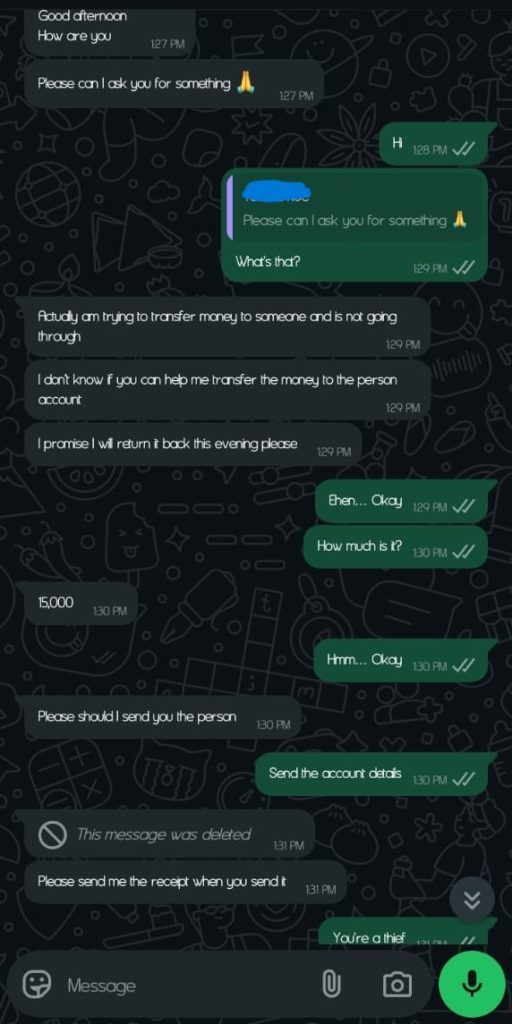


If you receive any unexpected message or call asking for a code, money to be paid back later, or access to your account, it’s most likely a scam, request a video call to confirm the person you are chatting with. WhatsApp does not require you to send codes to others, and no one should ever ask for your 6-digit verification code or any OTP.
Please note: Once hackers gain access to your WhatsApp account, they can impersonate you, scam your contacts, and lock you out of your own account.
How to Secure Your WhatsApp with Two-Factor Authentication (2FA)
The best way to protect yourself is to activate two-step verification (also called two-factor authentication or 2FA) on WhatsApp. This adds an extra layer of security by requiring a unique PIN each time your WhatsApp account is registered on a new device.

Here’s how to enable Two-Step Verification on WhatsApp:
- Open WhatsApp: Launch the app on your mobile device.
- Go to Settings: Tap the three-dot icon in the top-right corner (for Android) and select Settings.
- Navigate to Account: Tap on Account from the list of options.
- Tap Two-step Verification: Choose Two-step verification from the menu.
- Turn It On: Tap Turn on or Set up PIN to start the process.
- Create a PIN: Enter a secure 6-digit PIN of your choice. Avoid using simple or obvious numbers like your date of birth.
- Add an Email Address (Optional but Recommended): This will help you recover your account if you ever forget your PIN. You will be asked to confirm the email address before proceeding.
- Save Your Settings: Complete the setup and make sure everything is working properly.
Important Tips:
- Never share your verification code with anyone.
- Avoid using personal details like your birthday as your 2FA PIN.
- Don’t respond to suspicious messages asking for urgent help or codes.
- If you suspect your account has been compromised, report it to WhatsApp immediately.
Stay Secure, Stay Informed
At Indigitech NG, we’re committed to helping you protect your digital life. Whether you’re a small business owner, a student entrepreneur, or just someone who wants to stay safe online, securing your WhatsApp is a critical step.
For more practical tech tips, digital solutions, and web support services, visit www.indigitech.ng or follow us on our social media platforms.
We’re in a digital age. Whatever you do, you need an online presence—whether to document your journey, tell your story, or sell yourself. But above all, protect that presence.