If you are a student in 2026 and studying still feels overwhelming, exhausting, or unproductive, there’s a very high chance the problem is not your intelligence. It is also not that your course is “too hard” or that others are just “naturally smart.”
More often than not, the real issue is how you are studying, and the fact that you are not using the tools already available to you well.
We live in a time where artificial intelligence is no longer a luxury reserved for tech people or big companies. AI is already embedded in tools you use daily, especially Google products. Yet, many students are either:
- Not aware of these tools, or
- Using them in a very shallow way (copy-paste, quick answers, surface-level help)
One Google AI tool stands out for students across medicine, nursing, engineering, law, arts, education, business, and social sciences, but most people are barely scratching the surface.
That tool is Google NotebookLM.
This article will show you:
- What Google NotebookLM really is
- Why it is different from other AI tools
- How students in any field can use it effectively
- How it can help you understand better, remember longer, and study smarter
- What to do right now to start benefiting from it
You will miss the most sweetest part of this guide if you don’t read it to the end. So, let’s get started.
What Is Google NotebookLM (In Simple Terms)?
Google NotebookLM is an AI-powered research and study assistant designed to work with your own materials.
Unlike many AI tools that pull random information from the internet, NotebookLM focuses on your lecture notes, PDFs, textbooks, slides, articles, and research papers. You upload your materials, and the AI helps you interact with them intelligently.
Think of it as a smart study partner, a personal tutor that knows your exact notes, a tool that helps you ask better questions about what you’re learning.
It does not replace thinking. It supports deeper thinking.
Here’s what makes it powerful: NotebookLM only works with what you give it. When you upload your course materials, it becomes an expert on YOUR specific content. Every answer it provides includes references to the exact page or section in your uploaded materials. No random internet facts. No information that’s outside your syllabus.
Why Most Students Are Still Studying the Hard Way
Let’s be honest. Many students still read for hours without retention, highlight everything and remember nothing, rely on last-minute cramming, confuse reading with understanding, and memorize instead of learning.
The academic system rarely teaches students how to learn. You are expected to figure it out by trial and error.
That’s why two students can attend the same lectures, read the same books, and yet perform very differently. The difference is not IQ. It is strategy.
If you’re a Nigerian student, you know the additional challenges: large class sizes mean less individual attention from lecturers, recommended textbooks are often expensive or unavailable, and you’re frequently left to figure things out on your own. This is exactly where NotebookLM becomes your secret weapon.
NotebookLM helps you fix this gap, if you use it well.
What Makes NotebookLM Different from ChatGPT or Other AI Tools?
This is important. Most AI tools give generic answers, pull from mixed-quality internet sources, and sometimes hallucinate or oversimplify.
NotebookLM works differently.
1. It Grounds Answers in Your Materials
When you ask questions, it answers based on what you uploaded, not random content. This means less misinformation, more accuracy, and better alignment with your curriculum.
For example, if you’re studying Nigerian Constitutional Law and upload your course materials, NotebookLM will reference the specific provisions and cases from your uploaded documents, not generic information about constitutional law from other countries.
2. It Helps You Think, Not Just Copy
NotebookLM encourages asking follow-up questions, exploring connections, and clarifying confusing areas. The interface is designed to make you engage with your materials, not just extract quick answers to copy into assignments.
3. It Is Built for Learning, Not Just Speed
It is slower than quick-answer AI tools, and that’s a good thing. Learning requires depth, not shortcuts. NotebookLM shows you where it found each answer in your materials, encouraging you to verify and understand the context.
4. You Can Upload Multiple Sources and It Connects Them
Upload your textbook, lecture slides, and YouTube video transcripts all in one place. NotebookLM analyzes all of them together and can show you how concepts from different sources relate to each other.
How Students Across Different Fields Can Use NotebookLM
This tool is not for one discipline. Let’s look through how to make NotebookLM work for you.
Medical, Nursing & Health Science Students
These fields involve heavy content, complex concepts, and application-based learning. NotebookLM can help you break down complex physiological processes, compare disease conditions side-by-side, generate practice questions from your notes, and create simplified explanations you can teach others.
Example: Upload your lecture slides on cardiovascular physiology and ask:
- “Explain this topic as if I’m teaching a first-year student.”
- “What are the main differences between systolic and diastolic heart failure?”
- “Generate 15 practice questions about cardiac cycle regulation.”
If you can teach it simply, you understand it. NotebookLM helps you get to that level of understanding.
Practical use case: A nursing student preparing for pharmacology exams can upload drug classification notes and ask NotebookLM to create a comparison chart of similar medications, their mechanisms of action, and side effects, all organized for easy memorization.
Engineering & Technology Students
Engineering is about concepts plus application. NotebookLM helps by explaining abstract theories in simpler terms, connecting formulas to real-world applications, helping you revise technical documentation, and generating step-by-step explanations.
You can upload lecture notes, technical manuals, and research papers, then ask:
- “What is the practical meaning of this concept?”
- “What mistakes do students commonly make here?”
- “Explain how this formula applies to real-world scenarios.”
Practical use case: A computer science student learning algorithms can upload their data structures notes and ask NotebookLM to explain the time complexity differences between sorting algorithms with real-world examples, when would you use quicksort versus mergesort in actual applications?
Law & Social Science Students
Law and social sciences require critical thinking, interpretation, and argument building. NotebookLM can summarize long cases or articles, compare legal principles, help structure arguments, and clarify confusing sections.
Instead of reading blindly, you engage with the material actively.
Example questions to ask:
- “What are the key legal principles established in this case?”
- “Compare this case with the previous one I uploaded, how are the judgments different?”
- “What are the policy implications of this legal decision?”
Practical use case: A law student can upload three related Supreme Court judgments and ask NotebookLM to identify the evolution of legal thinking on a particular issue, showing how judicial interpretation changed over time.
Arts, Education & Humanities Students
For students who deal with theories, philosophies, historical texts, and literature, NotebookLM helps you understand context, draw themes, compare perspectives, and prepare teaching notes or essays.
It is especially powerful for reflection-based learning.
Example questions:
- “What are the main philosophical arguments in this text?”
- “How does this author’s perspective differ from the one in my other uploaded reading?”
- “What historical context influenced this literary work?”
Practical use case: An education student preparing to teach can upload curriculum documents and lesson planning guides, then ask NotebookLM to suggest teaching strategies for different learning styles based on the uploaded materials.
Business & Economics Students
Business education involves case studies, theories, and real-world application. NotebookLM can analyze business case studies and extract key decision points, compare economic theories and their applications, create practice scenarios based on your course materials, and help you understand complex business models.
Example questions:
- “What were the strategic mistakes made in this business case?”
- “How does Keynesian economics differ from Classical economics based on my notes?”
- “Generate discussion questions for this marketing case study.”
Practical use case: Upload a business textbook chapter on market segmentation along with case study materials, then ask NotebookLM to create practice scenarios where you must decide on segmentation strategies for different types of businesses.
Key Study Superpowers Inside NotebookLM
Unlike other AI tools that got tired when you upload your reference documents, NotebookLM call them “Sources” and you can upload your entire syllabus for a course, including links.
Here’s where many students are sleeping on this tool. These features can completely transform how you study.
1. Audio Overview (Your Personal Study Podcast)
This is one of NotebookLM’s most powerful features. Click “Audio Overview” and the AI generates a podcast-style conversation between two AI hosts discussing your study materials. The conversation typically runs 10-20 minutes depending on the source you selected.
Why this matters: You can learn while commuting to school, exercising, cooking, or during any activity where reading isn’t practical. The AI hosts explain your course content in conversational, easy-to-understand language.
How to use it:
- Upload your materials for an upcoming exam
- Generate the audio overview
- Listen at 1.5x speed to save time
- Download the file to listen offline
- Use it for final review the night before exams
Pro tip: Listen to the audio overview before reading the full materials. This gives you a mental framework that makes the detailed reading much easier to understand.
2. Generating Practice Questions
Instead of passively reading, ask: “Generate 20 practice questions from this material.”
This forces active recall, which is proven to improve memory retention better than simply re-reading notes.
Different types of questions you can request:
- “Generate multiple-choice questions for this chapter”
- “Create essay-style questions that test deep understanding”
- “Give me 10 true/false questions for quick review”
- “What are likely exam questions based on this material?”
Study strategy: Answer the practice questions without looking at your notes first. Then ask NotebookLM to explain the correct answers. Focus extra study time on questions you got wrong.
3. Creating Study Guides
Click “Study Guide” and NotebookLM automatically generates a comprehensive overview including a summary of key concepts, important topics organized by theme, critical points to focus on, and connections between different concepts.
When to use this:
- At the beginning of studying a new topic (to see the big picture)
- Before exams (for final review)
- When you feel lost in details (to refocus on what matters)
The study guide shows you the forest, not just the trees.
4. Creating Flashcards
While NotebookLM doesn’t create physical flashcards automatically, you can ask it to format information perfectly for flashcard creation:
“Create flashcard-style content from these notes: put the question on one line, then the answer on the next line.”
Perfect for revisions, quick recall, and on-the-go studying. Copy the output into physical flashcards or digital flashcard apps.
5. Summarizing Without Oversimplifying
Instead of shallow summaries that lose important details, you can ask:
- “Summarize this while keeping important details.”
- “Give me a comprehensive summary that includes all key points.”
- “Summarize this at different levels: basic, intermediate, and advanced.”
This prevents loss of meaning while still making large amounts of content manageable.
6. Teaching-Style Explanations
One of the most powerful features is requesting different explanation styles:
- “Explain this like I’m a beginner.”
- “Explain this like I’m preparing for exams.”
- “Explain this using simple everyday examples.”
- “Explain this in technical detail for advanced understanding.”
Different explanations for different stages of learning. Start simple, then request more complex explanations as your understanding grows.
7. Finding Connections Between Concepts
When you’ve uploaded multiple sources, ask:
- “How does the concept in Document A relate to what’s discussed in Document B?”
- “What themes appear across all my uploaded materials?”
- “Where do these different sources agree or disagree?”
This helps you see the bigger picture and understand how different parts of your course fit together.
8. Clarifying Confusing Sections
When you hit a confusing paragraph or concept, copy it into NotebookLM and ask:
- “Break this down into simpler terms.”
- “What does this really mean?”
- “Give me an example that illustrates this concept.”
Instead of staying confused or skipping difficult sections, you can work through them systematically.
Why This Tool Helps Mental Health Too
This part matters. Academic stress often comes from feeling behind, feeling confused, and feeling incapable. When you understand better, anxiety reduces. When learning feels structured, confidence grows. When you can see your progress through practice questions and self-testing, imposter syndrome decreases.
NotebookLM doesn’t remove effort, it removes unnecessary struggle. There’s a difference between productive difficulty (which helps learning) and unproductive confusion (which just causes stress).
The tool helps you focus your mental energy on actual learning rather than wasting it on frustration and disorganization.
Common Mistakes Students Make with AI Tools (And How to Avoid Them)
Let’s be clear. AI is not magic. Here are mistakes to avoid:
Mistake 1: Copying Answers Blindly
Wrong approach: Ask NotebookLM to write your essay or complete your assignment, then submit it as your own work.
Right approach: Use NotebookLM to understand concepts, generate study questions, and clarify confusion, then write your assignments in your own words based on your improved understanding.
Mistake 2: Using It to Skip Thinking
Wrong approach: Never reading your actual materials, just asking NotebookLM for summaries of everything.
Right approach: Read your materials first, then use NotebookLM to test your understanding, fill gaps, and reinforce learning.
Mistake 3: Relying on It Last-Minute
Wrong approach: Ignoring your studies all semester, then trying to upload everything the night before exams hoping NotebookLM will save you.
Right approach: Use NotebookLM consistently throughout the semester as part of your regular study routine.
Mistake 4: Not Verifying Information
Wrong approach: Assuming every answer NotebookLM gives is 100% accurate without checking.
Right approach: Use the source citations NotebookLM provides to verify important information in your original materials.
Mistake 5: Uploading Too Much at Once
Wrong approach: Dumping 15 textbooks into one notebook and expecting coherent answers.
Right approach: Create separate notebooks for each subject or topic, focusing on materials relevant to your current study goal.
Mistake 6: Not Asking Follow-Up Questions
Wrong approach: Getting one answer and moving on.
Right approach: Treat NotebookLM like a tutor, ask “why,” “how,” and “what if” questions to deepen your understanding.
Remember: AI should support learning, strengthen understanding, and improve efficiency, not replace your brain.
Google NotebookLM is not the solution to all academic problems, but used well, it can completely change how you learn.
DO THIS NOW: Practical Action Section
Don’t just read this article. Act. Here’s your 30-minute action plan to start using NotebookLM today:
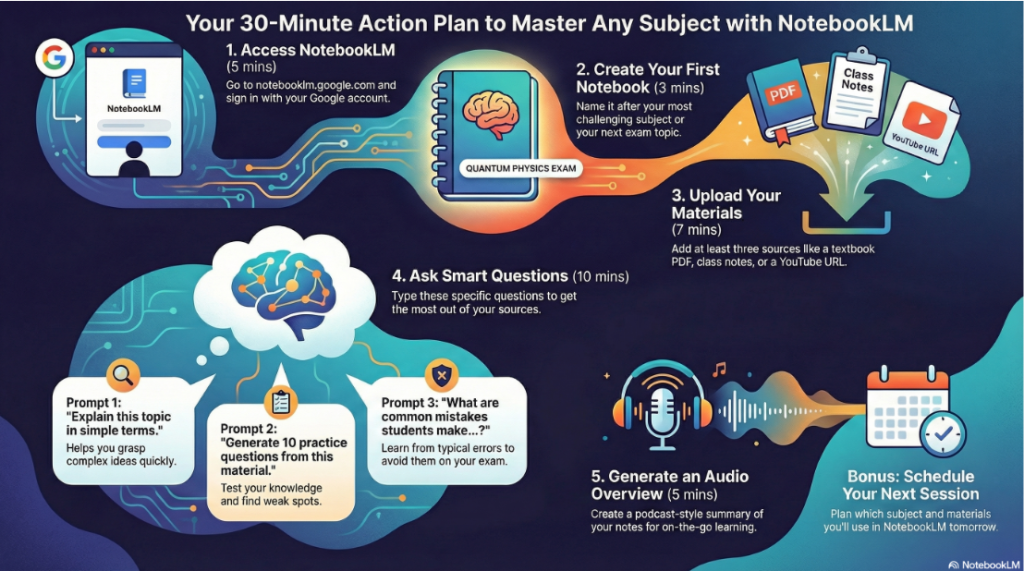
Step 1: Access NotebookLM (5 minutes)
Go to notebooklm.google.com and sign in with your Google account. If you don’t have a Gmail account, create one free, it takes 3 minutes.
The tool works on laptops, tablets, and phones, though a laptop or tablet gives you the best experience.
Step 2: Create Your First Notebook (3 minutes)
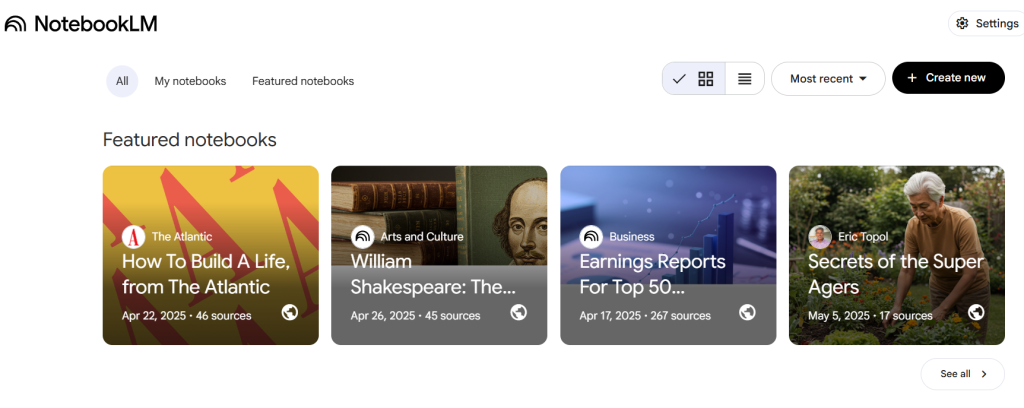
Click “Create New Notebook.” Name it after your most challenging subject or your next exam topic.
Examples:
- “Organic Chemistry Midterm”
- “Constitutional Law Review”
- “Business Statistics Final”
- “JAMB Mathematics Preparation”
Step 3: Upload Materials (7 minutes)
Locate the file in your phone or laptop first. Then goto the NotebookLM, click “Add Source” and upload at least three different sources:
- A textbook chapter (PDF)
- Your class notes (Google Doc or PDF)
- A relevant educational YouTube video (just paste the URL)
- For powerpoint slides, convert to PDF first.
Wait for NotebookLM to process them, this takes about 30 seconds to 2 minutes depending on file size.
Step 4: Ask These Three Questions (10 minutes)
Type each question one at a time and read the answers carefully:
- “Explain this topic in simple terms.”
- Read the explanation
- Check if you understand it
- If not, ask “Can you explain with an example?”
- “Generate 10 practice questions from this material.”
- Try answering them without looking at your notes
- Ask NotebookLM to explain any questions you couldn’t answer
- “What are common mistakes students make when learning this topic?”
- This helps you avoid typical pitfalls
- Focus your studying on these areas
Step 5: Generate an Audio Overview (5 minutes)
Click the “Audio Overview” button and let NotebookLM create a podcast about your materials. Listen to the first 5 minutes. Notice how the AI hosts discuss your course content in conversational language.
Download the audio file so you can listen during your commute tomorrow.
Bonus Step: Set Your Study Schedule
Before you sleep tonight, decide:
- Which subject will you create a NotebookLM notebook for tomorrow?
- What materials will you upload?
- What specific questions do you need answered?
Write this down or set a phone reminder.
How to Build This Into Your Study Routine
NotebookLM is powerful, but it works best as part of a complete study system:
Before lectures: Generate audio overviews to preview topics. You’ll walk into class already familiar with key concepts.
During lectures: Take better notes because you understand the basics. You can focus on what the lecturer emphasizes rather than trying to understand everything from scratch.
After lectures: Upload your fresh notes and ask clarifying questions while the lecture is still in your mind.
During study sessions: Generate practice questions and study guides. Test yourself actively instead of passively re-reading.
Before exams: Create final review materials and use audio overviews for last-minute reinforcement.
Think of NotebookLM as your 24/7 study partner that never gets tired of explaining concepts or answering your questions.
Real Student Success Pattern
Here’s how successful students are using this tool across Nigeria:
Week 1-2: They experiment with NotebookLM on one subject, learning how it works.
Week 3-4: They develop a consistent routine of uploading materials after each lecture and asking clarification questions.
Week 5-8: They use generated practice questions regularly, treating NotebookLM like a personal quiz generator.
Exam week: They use audio overviews for final review and study guides to focus on key concepts.
Result: Better understanding, less anxiety, higher grades, not because they’re smarter, but because they’re studying smarter.
Your Study Life Is About to Change
You are not dumb. You are not slow. You are not incapable. You have most likely been using outdated methods ina new world.
Most students are just using outdated methods in a new world. While the academic system hasn’t changed much in decades, the tools available to students have transformed completely.
Google NotebookLM is not the solution to all academic problems, but used well, it can completely change how you learn. Study smarter. Think deeper. Use the tools available to you.
The students who will thrive in 2026 and beyond aren’t necessarily the ones who work the hardest, they’re the ones who work the smartest, using technology to amplify their efforts rather than replace them.
Your competition might already be using these tools. The question is: will you?
Need help setting up AI tools or tech solutions for your school, business, or personal use?
That’s exactly why Indigitech NG exists, to make technology simple, useful, and human-centered. Whether you need an exam portal setup for your school (imagine your students using AI-powered study tools combined with secure digital exams), a professional website for your business, virtual assistant services to manage your workload, or IT support to solve your tech challenges, I’m here to help.
Visit indigitech.ng to learn more about how I can help you work smarter with technology.
Found this helpful? Share it with a classmate who’s struggling with their studies. Sometimes the best way to learn is to teach others what you’ve discovered. Use the share buttons below or send them the link directly.
Your turn: Have you tried NotebookLM? What subject are you planning to use it for first? Drop a comment below and let me know, or share any tips you’ve discovered! I read and respond to every comment.
Coming next: In another coming post, I’ll show you advanced strategies for getting even more out of NotebookLM, including how to use it for group study, exam preparation workflows, and combining it with other tools for maximum effectiveness. Subscribe to the blog so you don’t miss it.